Cronometer vs Lose It!
Cronometer vs Lose It!: curated nutrition data and free micronutrients vs the simplest weight-loss logging in the category. Verdict by user type.
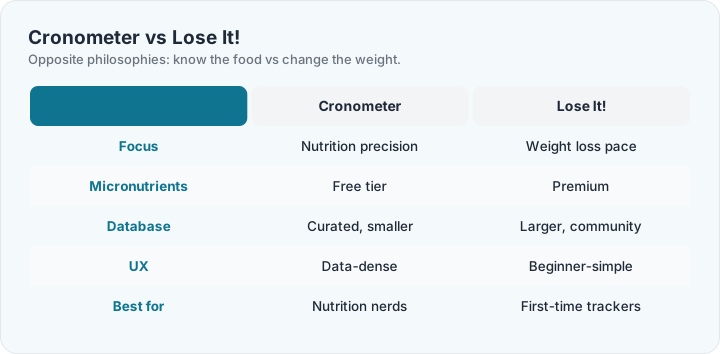
The cleanest philosophical split in the category. Cronometer is a precision instrument: curated lab-grade food data, the full micronutrient panel free, an interface that shows you everything. Lose It! is a habit machine: the fastest logging of any major app, weight-loss projections up front, and a design that hides complexity until you ask for it.
Use Cronometer when the question is "what exactly is in this food" — micronutrient tracking, athletic fueling, keto electrolytes, therapeutic diets where data provenance matters. Use Lose It! when the question is "how do I eat less without thinking about it" — first-time trackers, speed logging, and anyone whose previous tracking attempt died of friction.
The crossover test: log one normal day in both. If Cronometer's detail excites you, you are a Cronometer user who has not met yourself yet. If it exhausts you, Lose It! will still be open in week eight — which is the only metric that matters in this category. Both pair cleanly with the TDEE calculator; both cost nothing to try, so the argument resolves in an evening.
Frequently asked questions
Is Cronometer or Lose It! better for weight loss?
Lose It! — its projections, pace settings and low-friction logging are built for the weight-loss job. Cronometer is better for doing the same job with nutrition precision alongside.
Which free tier is better?
Cronometer's — micronutrients and scanning free, no diary ads. Lose It! free adds scanning too but keeps micronutrients Premium. Both are genuinely usable free.
Is Cronometer harder to use?
Initially, mildly — it shows more. The diary itself is simple; the density is in the analysis views you can ignore until you want them.
Which app has better barcode scanning?
Both include scanning free — a category rarity. Cronometer matches against curated data (fewer hits on obscure brands); Lose It! matches a larger community catalog (more hits, more variable quality).
Can I switch between them later?
Yes — nothing locks in. Weights, goals and streaks re-enter in an evening; meal histories do not transfer. Many people do one week in each and keep the one they actually opened daily.
Which is better for family cooking and recipes?
Both handle recipes; Lose It! recipe import is friendlier, Cronometer recipe nutrition analysis is deeper. Households cooking whole foods lean Cronometer; convenience-food households lean Lose It!.
Which syncs with smart scales?
Both pull weight from Bluetooth scales via Apple Health/Google Fit intermediation. Direct integrations are limited on both — the health-platform bridge is the practical path.
Which app works without an internet connection?
Lose It! logs offline and syncs later; Cronometer needs connectivity for its curated database lookups. Spotty-signal kitchens and travelers: Lose It! has the edge here.